Your entire fleet.
One browser tab.
GPS tracking, duress management, voice recording, lone worker, guard patrol, job ticketing — everything your operations team needs, running in any browser on any laptop. No software. No IT ticket. Just open and go.
Your radios work without it. They just work at about 30% capacity.
Push-to-talk voice comes standard with every Press2TALK radio. The Advanced Web Dispatcher is what you add when voice isn’t enough — when you need to see where your people are, manage a duress event, replay a GPS route from six months ago, or run a guard patrol across three sites from one screen.
It’s a separate purchasable product that turns any laptop or PC into a complete fleet management and operations control platform. Browser-based. No software to install. Log in, and your entire fleet is in front of you.
GPS breadcrumb playback, duress/SOS management, voice recording with 36-month retention, lone worker shift monitoring, job ticketing, guard patrol with NFC checkpoints, geo-fencing, remote radio control — none of these are available without the Dispatcher. It’s not a power-user add-on. It’s the unlock that makes the system complete.
One platform. Three distinct operations.
The Dispatcher covers your full operation regardless of whether you’re running a transport fleet, a security operation, or a mixed field workforce. Different teams use different modules — but it’s all one platform.
Fleet & Transport Operations
- Live GPS + Track PlaybackKnow where every vehicle is. Replay any route for the past 36 months.
- Job TicketingDispatch jobs from the platform. Workers acknowledge, accept, complete.
- Voice RecordingEvery call recorded, date/time stamped. Searchable, playable, downloadable.
- Geo-fencingDefine zones. Get notified when a vehicle enters or exits.
- Duress ManagementSOS alerts with dedicated map view and response workflow.
- Statistical ReportsOnline time, call frequency, call duration — per vehicle, per group, any period.
Security Operations
- Duress/SOS Management CentreHigh-volume duress handling with alarm log, response timestamps, and closure records.
- Guard Patrol + NFCDefine patrol routes. T60K scans NFC checkpoints. Dispatcher logs proof of patrol automatically.
- Lone Worker MonitoringConfigurable shift windows, timer-based check-in escalation. No dedicated LW radios required.
- Remote Radio ControlStun, kill, revive, or reboot any radio from the Dispatcher. Instantly.
- Remote Hot MicHear ambient audio on any radio with a single click — without the operator knowing.
- Voice Recording as Evidence36-month retention. Every call has a timestamp, caller ID, and is downloadable.
Safety & Field Operations
- Lone Worker ComplianceTurn any radio into a lone worker device. Set shift timing and escalation without reprogramming hardware.
- Messaging PlatformText messages to any radio or group. Received messages auto-announced via text-to-voice on the radio.
- Video SurveillanceLive camera feeds piped straight into the Dispatcher console.
- Temporary WorkgroupsCreate and dissolve talkgroups on the fly — no network programmer required.
- Job TicketingFull task lifecycle management. From dispatch to completion on a single screen.
- RangingMeasure distance between any two devices on the map.
See what’s inside
Every module you need, visible in the screenshots below. These are live captures from the actual Dispatcher console — not mockups.
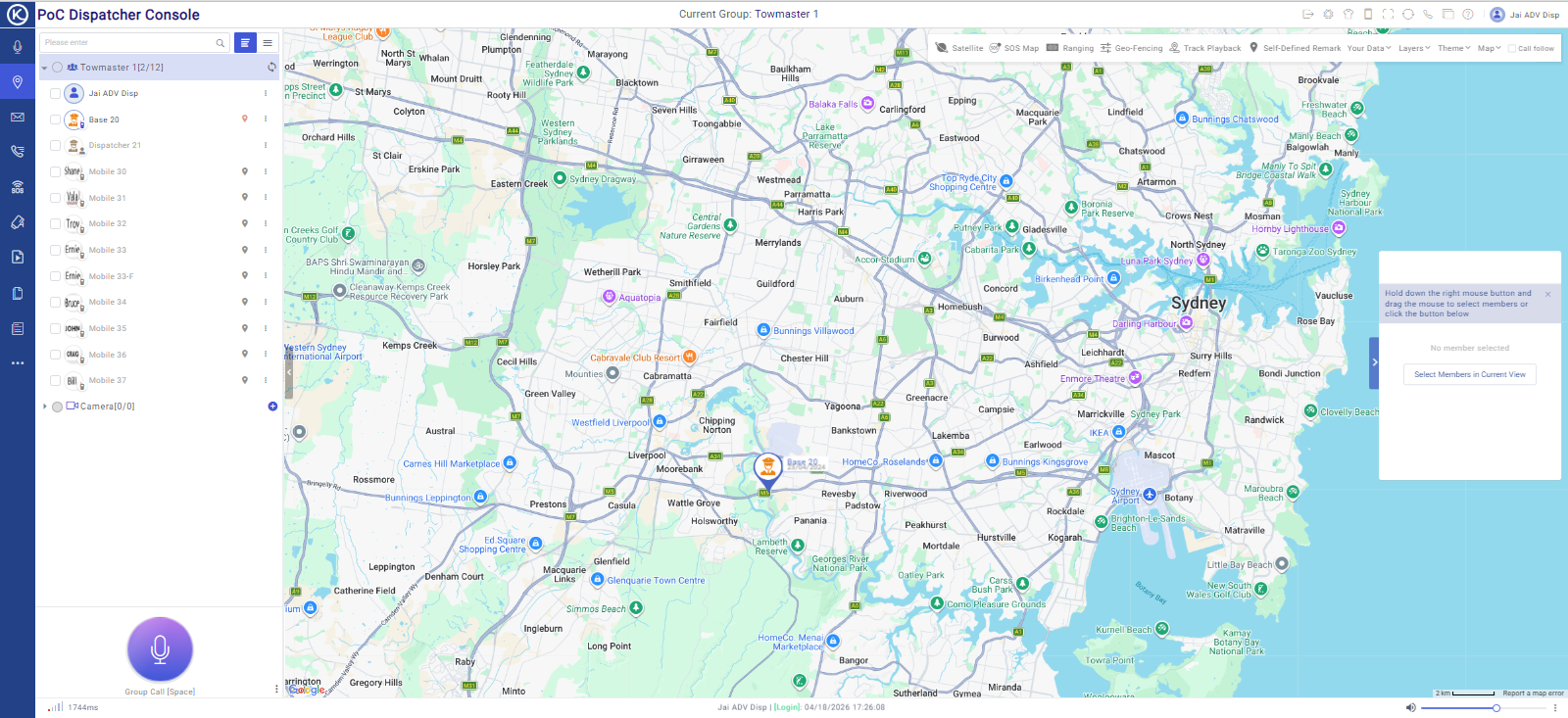
Live GPS Mapping & Track Playback
Every radio in your fleet appears as a live pin on a Google Maps base layer. See who’s where, right now. The map toolbar gives you SOS Map view, geo-fencing zone management, track playback, ranging (distance between devices), and self-defined remark annotations — all layered on top of your live fleet map.
- Live vehicle pins with operator name and last-seen timestamp
- Track playback — replay any radio’s GPS route for up to 36 months back
- Geo-fencing — draw zones, receive entry/exit alerts in real time
- SOS Map — dedicated view showing only radios with active duress alerts
- Ranging — measure the distance between any two devices on the map
- Drop custom marker pins and annotations on your own map layer
Voice Dispatching Console
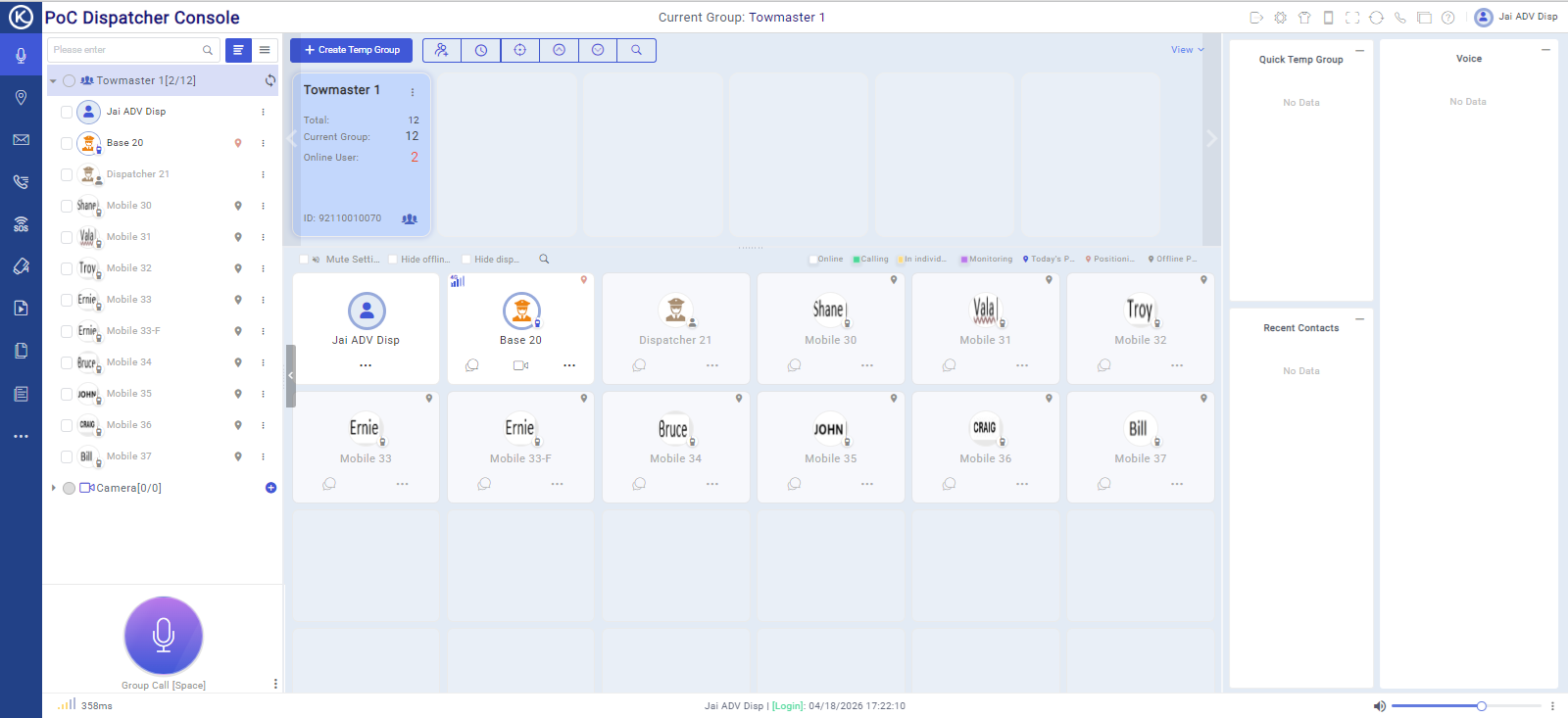
The core dispatching interface shows your entire group on a single screen — who’s online, who’s calling, who’s in what status. Initiate group calls, individual calls, all-calls, or broadcasts directly from the console. Create temporary talkgroups on the fly without any network configuration.
- Group call, individual call, broadcast call, all-call, and temp group — all from one interface
- Create and dissolve temporary workgroups instantly — no programmer required
- View online/offline status for every radio in your fleet
- Quick voice playback panel — replay the last transmission without leaving the dispatch screen
- Multiple dispatcher logins — more than one operator can manage simultaneously
Call Records & Voice Recording
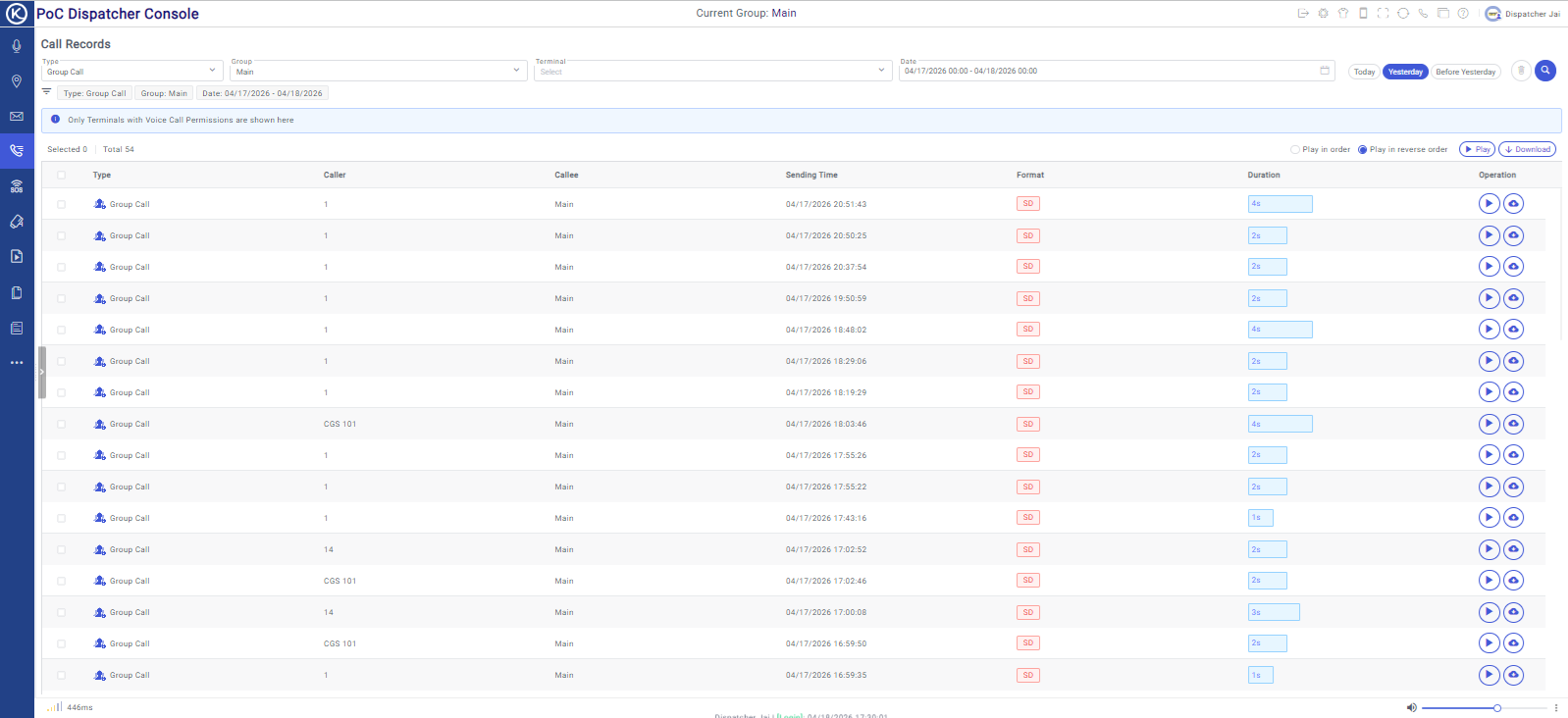
Every call — group, individual, broadcast — is recorded, date and time stamped, and stored for 36 months. Search by date range, caller, or group. Play back any recording directly in the browser, or download it for external use. For incidents, insurance, and compliance — this is the record that matters.
- All calls recorded automatically — no manual trigger required
- 36-month retention — most competitors offer 30–90 days
- Search by date, caller, callee, or call type (group/individual/broadcast)
- In-browser playback or direct download to your computer
- Call duration statistics with frequency breakdown per terminal
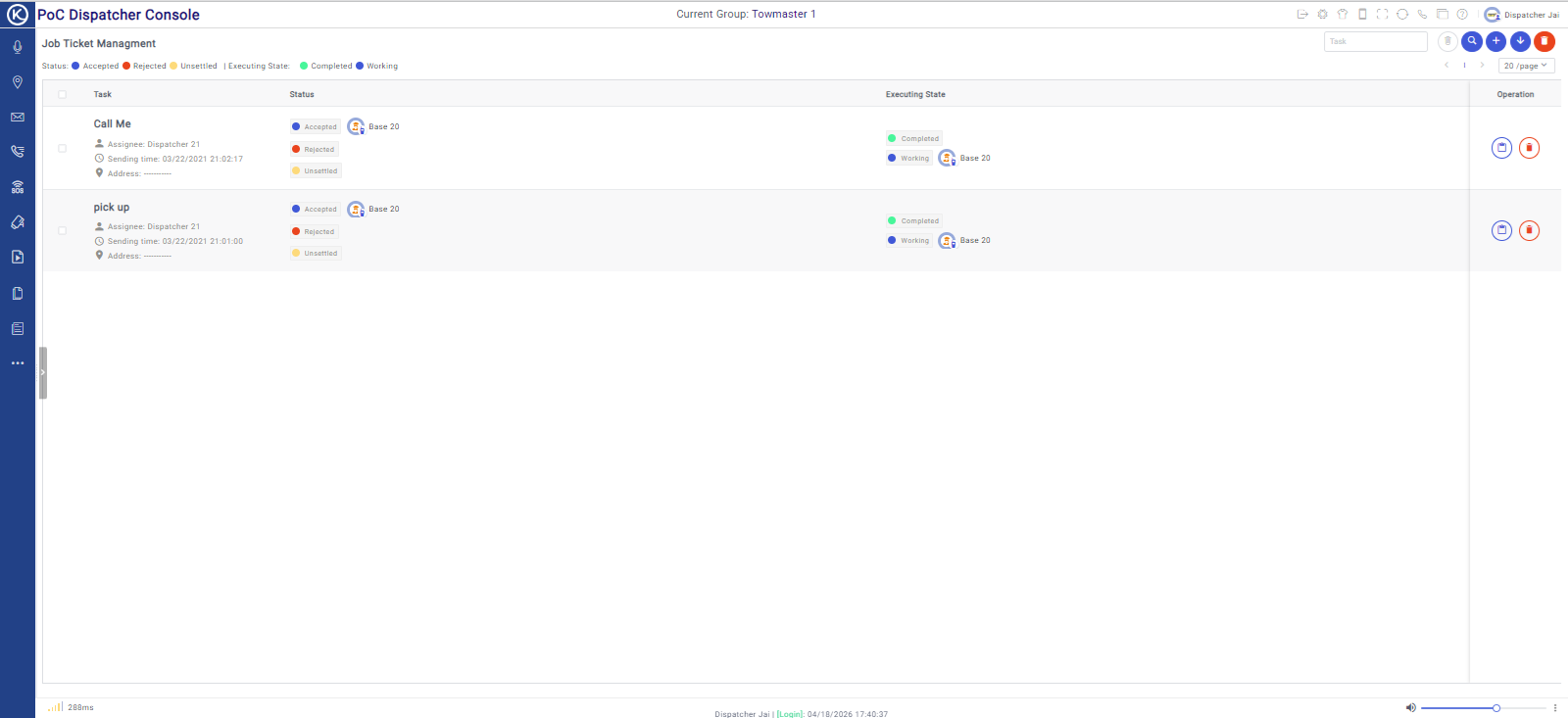
Duress / SOS Management Centre
When a duress alert fires, the Dispatcher doesn’t just send a notification — it opens a dedicated SOS management workflow. You see who triggered it, when, and where they are on the map. You can immediately initiate a remote hot mic to hear ambient audio from that device. Every alarm is logged with responder name, response time, and closure record.
- Dedicated SOS map view — shows only radios with active alerts
- Alarm prompt tone with visual alert — operators can’t miss it
- One-click remote hot mic — hear the scene without alerting the worker
- Full alarm log: date/time triggered, responder name, response time, closer, close time
- Free-form notes field — attach context to each incident record
- Built for high-volume environments — 600+ incidents manageable in a single view
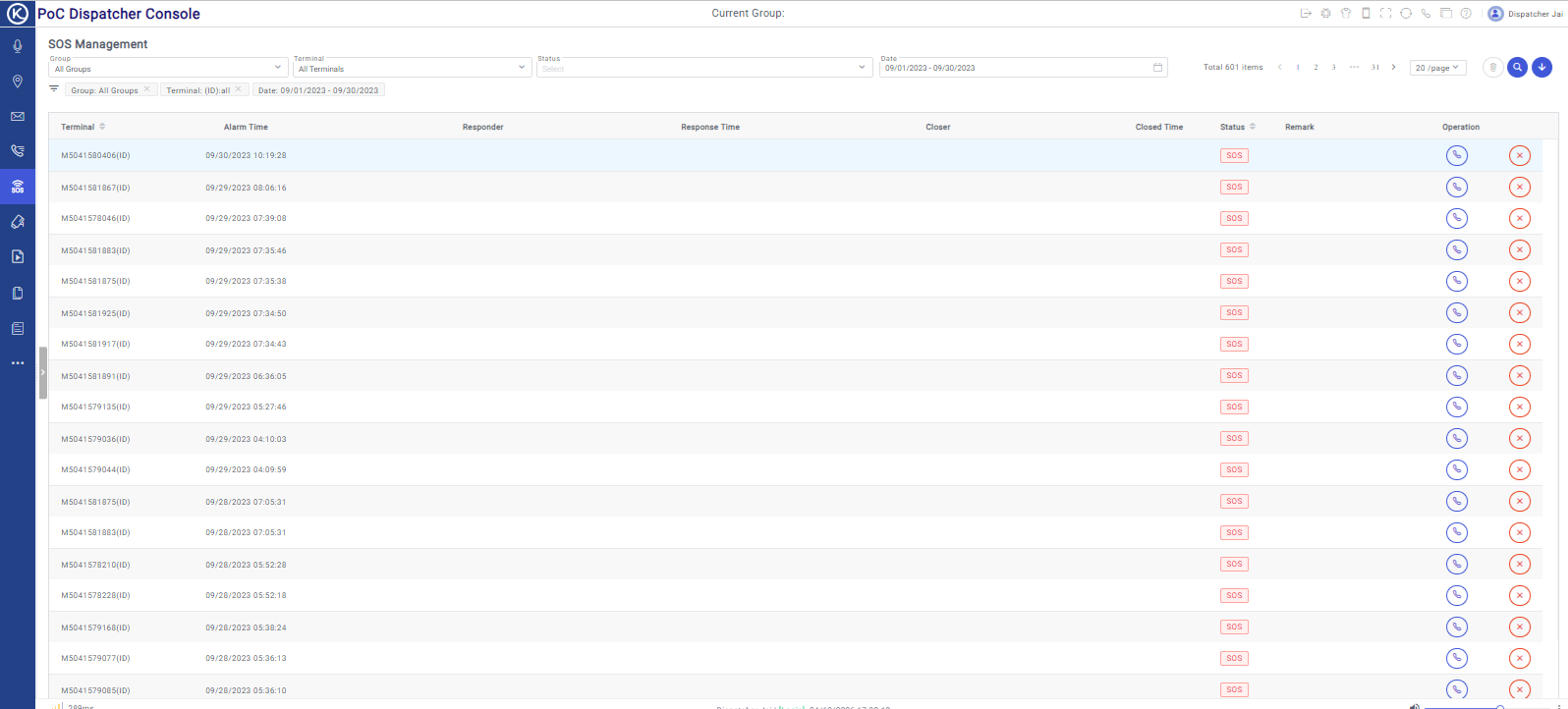
Lone Worker Management
Turn any radio in your fleet into a lone worker device — directly from the Dispatcher. No hardware reprogramming. No buying dedicated lone worker radios. Set the monitoring window, check-in interval, and which terminals to monitor, and the system handles the rest. Exceptions trigger automatic escalation.
- Assign lone worker monitoring to any terminal — directly from the Dispatcher
- Set shift date, monitoring window (start/end time), and check-in interval (minutes)
- Apply to multiple radios simultaneously — fleet-wide lone worker in minutes
- Exception notifications when a worker fails to check in within the set interval
- Status tracking: Working, On Plan, Finished — all visible from one screen
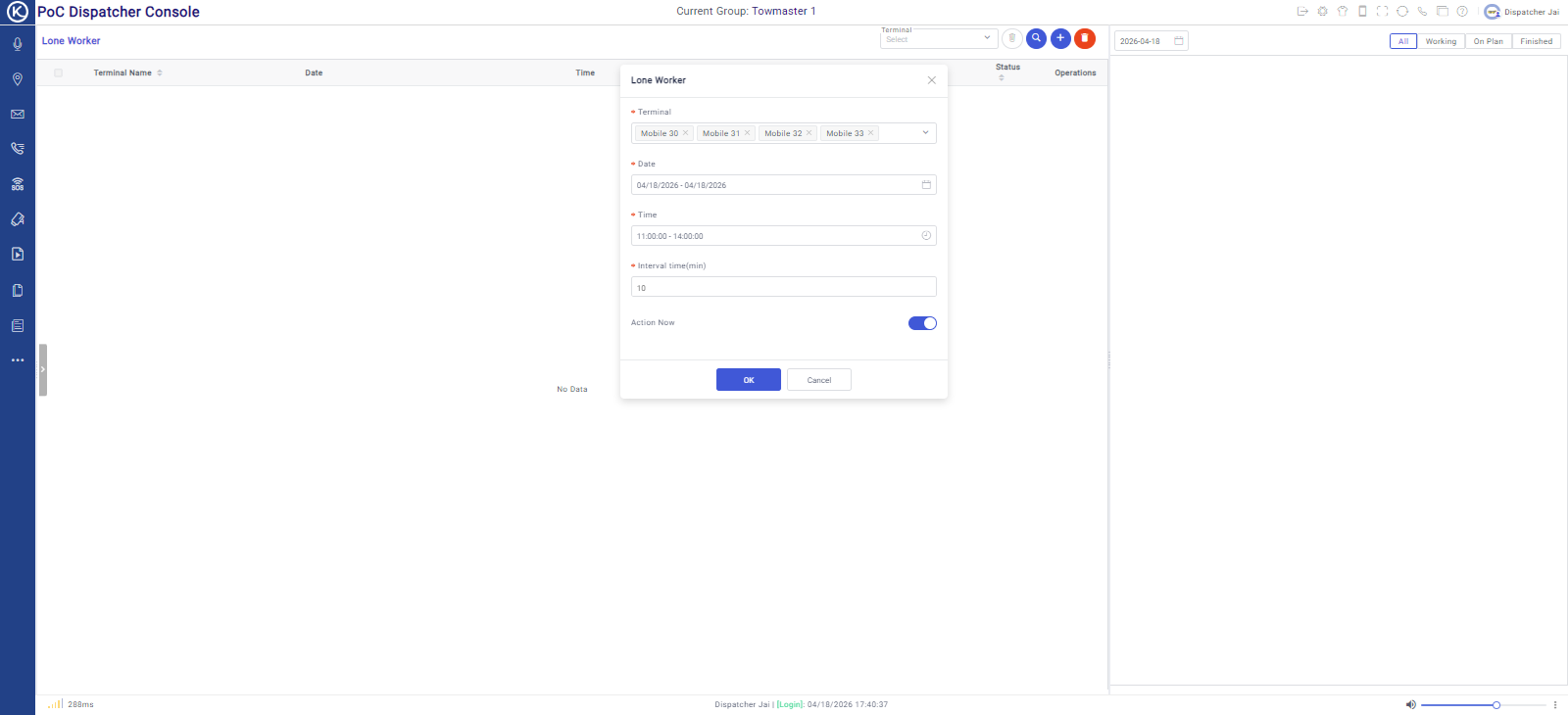
Guard Patrol Management
Define patrol routes as a series of named checkpoints. Guards tap their T60K against each NFC tag as they patrol. The Dispatcher logs every checkpoint scan with a timestamp — creating an automatic, tamper-evident record of route completion. No RFID wand. No separate patrol system. It’s built in.
- Create patrol plans with named routes, scheduled windows, and assigned patrollers
- NFC checkpoint integration — T60K taps each point, Dispatcher logs the proof
- Patrol calendar — schedule recurring patrol plans in advance
- Punch records — full audit trail of every checkpoint scan
- Works across multiple sites simultaneously — one Dispatcher managing many routes
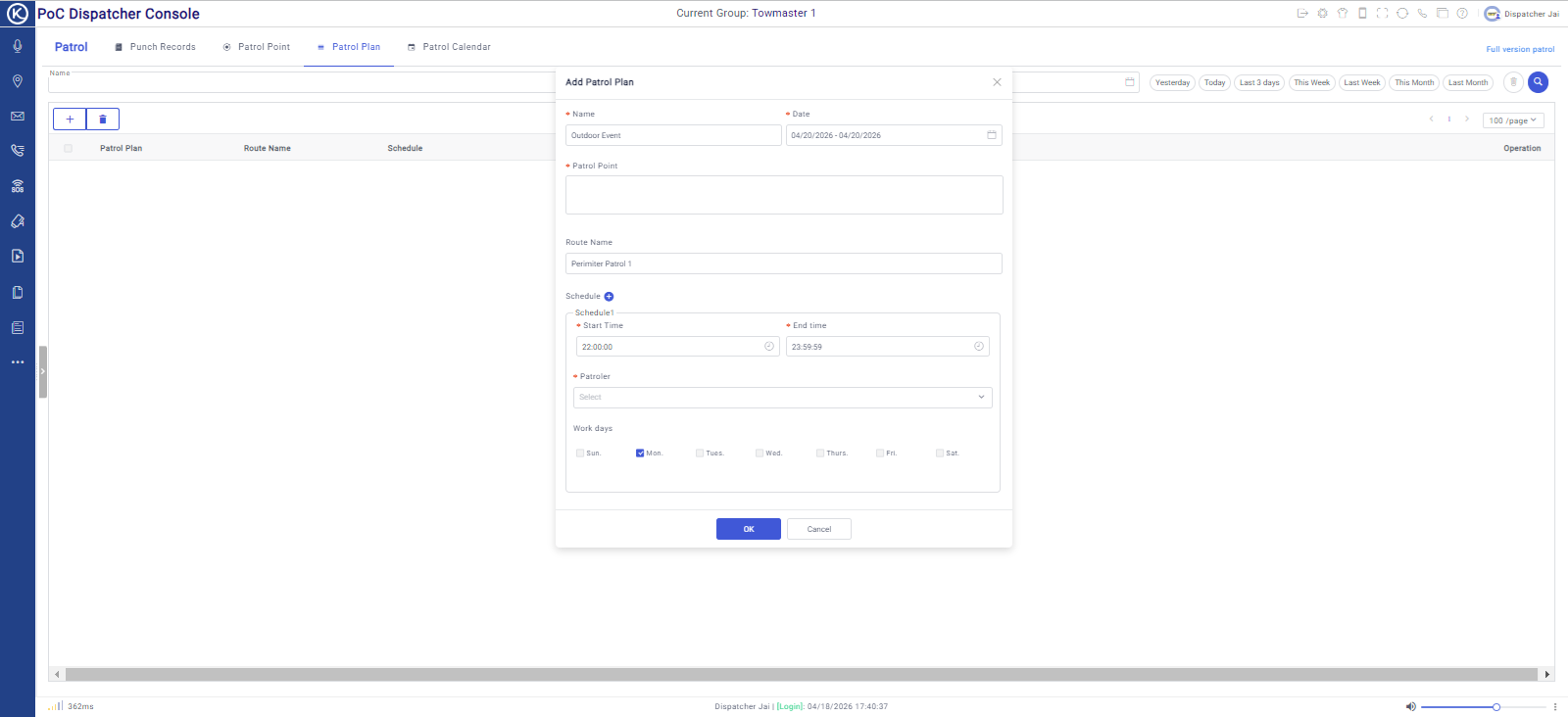
Job Ticket Management
Create a job ticket, assign it to a radio, and track it through to completion — all from the Dispatcher. The worker receives the ticket on their radio, accepts or rejects it, and marks it complete. You have a real-time status board and a permanent record of every job dispatched.
- Create and dispatch job tickets directly to any radio in the fleet
- Workers accept, reject, or mark complete — status updates in real time
- Full job log: created by, assigned to, sending time, execution state
- Accepted/Rejected/Unsettled status plus Completed/Working executing state — at a glance
- Permanent record — every job and its outcome is retained
Statistics & Reporting Dashboard
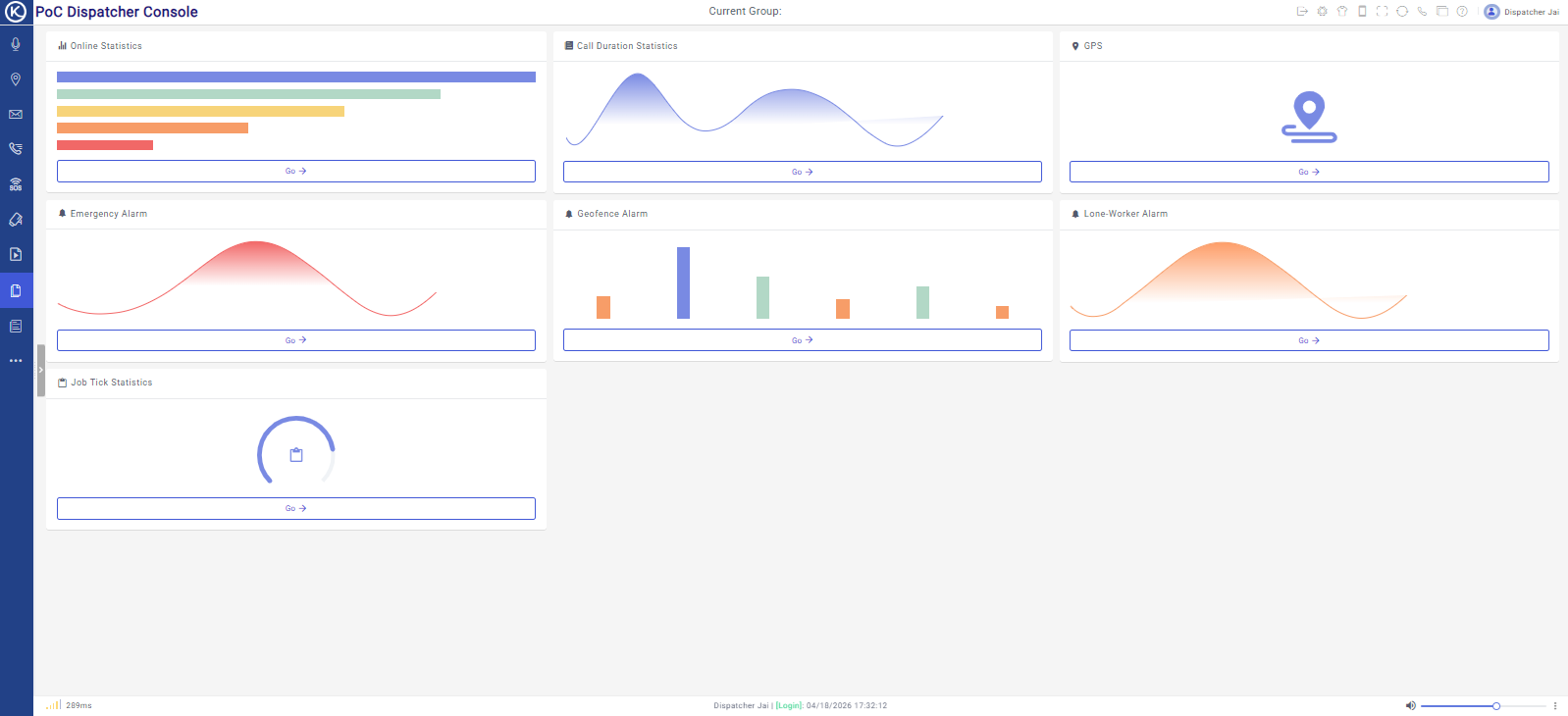
The Dispatcher includes a comprehensive reporting and statistics module covering every operational dimension: online time per terminal, call frequency and duration by type, emergency alarm history, geofence alarm logs, lone worker alarm records, and job ticket statistics. All filterable by group, terminal, and date range.
- Online Statistics — timeline heatmap showing each radio’s online duration per day
- Call Duration Statistics — frequency and duration by type (group, individual, broadcast, video)
- Emergency Alarm, Geofence Alarm, and Lone Worker Alarm trend charts
- Job Tick Statistics — task completion tracking
- Filter by group, individual terminal, or any custom date range
- Log file access — raw event logs for audit and compliance purposes
When a duress alert fires — here’s what happens next
The feature list says “duress management”. Here’s the actual workflow — because the value isn’t in the feature, it’s in how fast your team can respond.
Alert fires
Worker presses duress button on their radio. Alarm tone sounds at the Dispatcher. SOS map view opens automatically.
Location identified
The Dispatcher shows exactly where the worker is on the map. Who triggered it. When. One screen, no searching.
Hot mic activated
One click activates a remote hot mic — the dispatcher hears ambient audio from the scene without the worker’s radio making any noise.
Incident logged
Every alarm is recorded: triggered time, responder name, response time, closer, close time, and free-form notes. A permanent record.
Most competitors keep your data for 30–90 days. We keep it for 36 months.
That gap matters more than it sounds. Incidents don’t always surface immediately. Insurance claims can take months. Litigation takes longer. When a recording from 14 months ago becomes the critical piece of evidence, 90-day retention means it’s already gone.
GPS breadcrumb data and voice call recordings, both retained for 36 months. That’s 3 years of your fleet’s activity, searchable, replayable, and available whenever you need it.
How this compares
- Press2TALK GPS + voice recordings — 36 months
- Typical competitor Voice recording — 30–90 days
- GPS only platforms Track data — 3–12 months typical
Longer retention is a genuine differentiator for security companies with evidence obligations, and for transport operators managing insurance or compliance audits.
It runs in a browser. That’s the whole point.
Operations managers at small and medium transport and security companies don’t have IT departments. They don’t want to raise a software installation request and wait a week.
The Advanced Web Dispatcher runs in any browser on any laptop or PC. You open it the same way you open your WebMail. There’s nothing to install, nothing to update, and nothing that breaks when Windows patches itself on a Tuesday night. It deploys in minutes and is always current.
Any browser, any machine
Chrome, Edge, Firefox. Windows or Mac. Desktop or laptop. One login. Full access.
Always up to date
Updates deploy to the platform automatically. You never run an outdated version. There’s nothing to update on your end.
Multiple concurrent operators
Multiple dispatchers can log in simultaneously, each with their own unique login and permissions. Ideal for 24/7 control rooms.
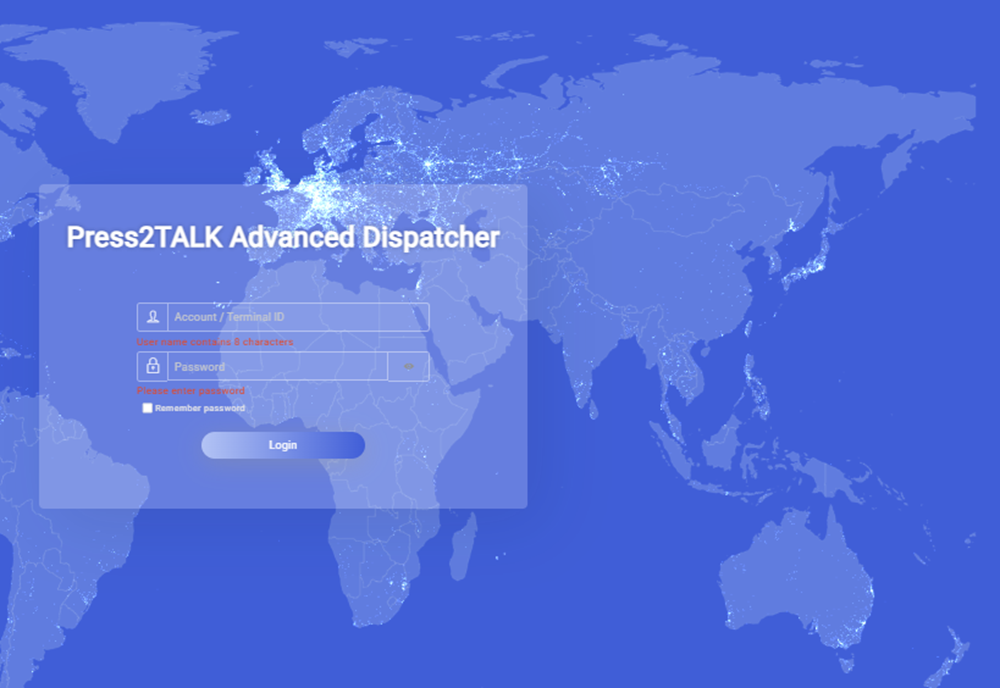
Australian WHS obligations require effective communication with isolated workers. The Dispatcher is how you meet those obligations.
Under Australian model WHS legislation, employers have a duty to manage the risk of working alone or in isolation. Workers in high-risk roles — security guards, transport operators, remote field workers — require monitoring systems that can detect an emergency and enable a timely response. The Dispatcher’s lone worker module is purpose-built for this requirement.
No dedicated hardware required
Assign lone worker monitoring to any radio in your fleet directly from the Dispatcher. No reprogramming, no specialist hardware, no extra equipment to procure.
Configurable shift windows
Set the exact date range, monitoring window (start and end time), and check-in interval in minutes. The system manages the timing — your operators manage exceptions.
Exception-based escalation
If a worker doesn’t check in within the set interval, the system flags the exception. Operators see it immediately — no manual tracking, no shift-by-shift spreadsheets.
Audit trail included
Every lone worker session is logged — when monitoring started, check-in history, and any exceptions. That record supports your WHS obligations and internal incident reviews.
Australian WHS context
Model WHS Regulations (Reg. 48) require PCBUs managing isolated or remote work to implement monitoring systems capable of detecting an emergency and summoning first aid or emergency services. Security workers, transport operators, and workers in remote locations are explicitly named as higher-risk. The Dispatcher’s lone worker module is designed to support this obligation — providing timing-based check-ins, exception alerts, and a documented audit trail.
No extra hardware cost
Traditional lone worker solutions require dedicated hardware — a separate device, a separate subscription, separate management. With the Dispatcher, you apply lone worker monitoring to the radio your worker already has. The cost is the Dispatcher subscription you likely need anyway.
One Dispatcher. Your whole fleet.
The Advanced Web Dispatcher manages all Press2TALK hardware simultaneously — vehicle-mounted units, handheld radios, and smartphone app users — from one login, one map, one screen.
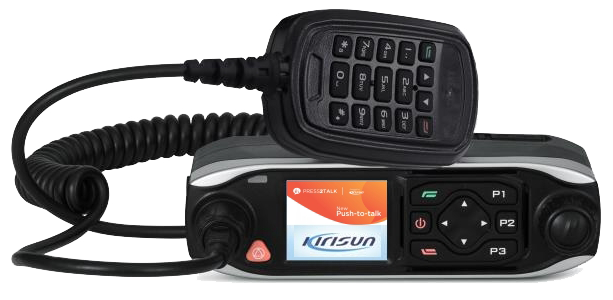
M50K — Vehicle Unit
Live GPS tracking, job ticketing, geo-fencing, and voice recording for your vehicle fleet. The M50K’s full capability only unlocks with the Dispatcher.
View M50K specs →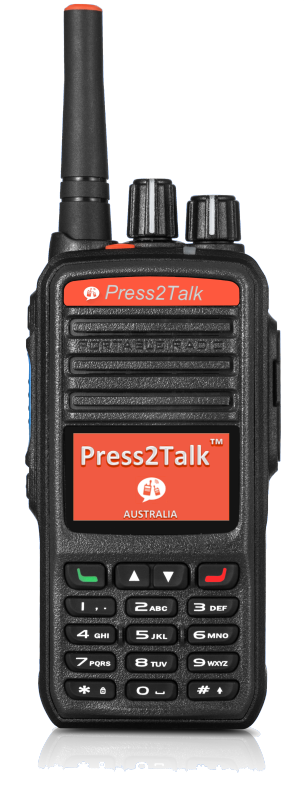
T60K — Handheld Radio
NFC guard patrol, lone worker monitoring, duress/SOS, and remote radio control. The T60K paired with the Dispatcher is a complete security operations platform.
View T60K specs →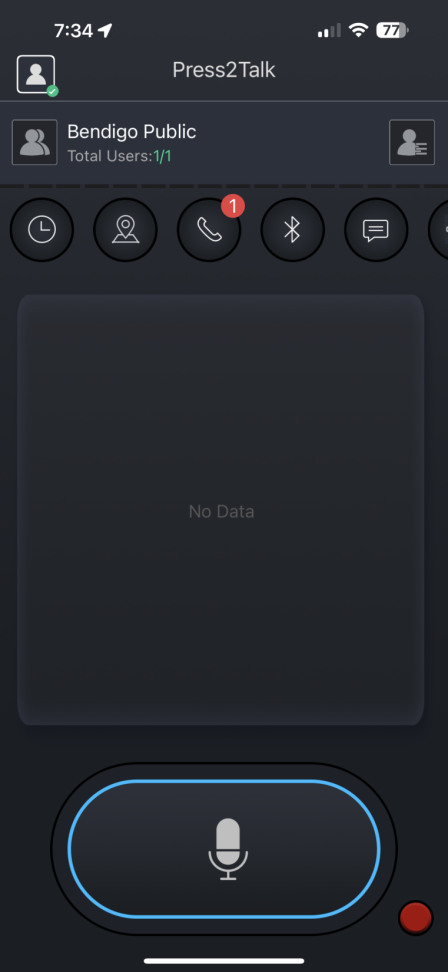
Smartphone App
Workers using the smartphone app appear alongside hardware radios on the same map, in the same groups, with the same Dispatcher features available.
View App details →Frequently asked
Practical answers to the questions we get asked most often about the Dispatcher.
Related pages
See the Dispatcher working on your fleet
Book a demo and we’ll show you exactly what the platform does for your specific operation — transport, security, or field workforce. 30 minutes. No obligation.